What Is a DC Power Connector and How Does It Work?

Time:2026-09-28 Author:Charlotte
0%

A Dc Power Connector may look like a small barrel plug or a compact two-pin terminal, but it carries an important job: delivering direct current safely and consistently. Its center pin, outer sleeve, metal contacts, and insulating body form a path between a power source and a device. Fit matters. A loose connection can interrupt power, create heat, or wear the contact surfaces over time. Even a connector that seems sturdy may fail when its cable is repeatedly bent.

Signal-integrity educator Dr. Eric Bogatin’s broader engineering perspective can be paraphrased this way: “Reliable performance depends on understanding the whole path, not just one component.” This is a paraphrase, not a verbatim quotation about DC connectors. The same idea applies here: voltage rating, current capacity, polarity, contact pressure, and cable strain relief all affect performance. A plug may fit physically and still be electrically unsuitable. That detail is easy to miss.

This guide explains what a Dc Power Connector is, how its contacts complete a circuit, and how common designs differ. You will see why polarity markings matter, what happens when contacts meet, and how to choose a connector for a device’s power needs. The practical details are often less tidy than a diagram suggests. Real cables bend, dust gathers, and contacts loosen. Understanding those conditions helps you make a more dependable connection.
What Is a DC Power Connector and How Does It Work?

Definition and Purpose of a DC Power Connector

A DC power connector is the physical interface that transfers direct current from a power supply to an electronic device. It usually consists of a plug, a matching socket, conductive contacts, and an insulating body. The connector does not create power; it provides a controlled path for power to reach a circuit. Small, but important.

Its purpose is to make the power connection removable while keeping the conductors aligned. A common barrel-style plug, for example, slides into a round socket, where inner and outer contacts carry the circuit’s positive and negative connections. Other designs use flat blades, locking tabs, or multiple pins. The shape alone does not confirm compatibility. Polarity, voltage, current capacity, and contact dimensions must all match the device’s requirements.

In practical use, a loose fit may cause intermittent power when a cable shifts on a desk. A connector with a locking feature can resist accidental disconnection, though it cannot correct an undersized cable or a poor socket. Some plugs look nearly identical but have different inner diameters or wiring arrangements. That detail matters. Check the device markings or technical documentation before connecting a supply, and avoid assuming that a familiar-looking plug is electrically suitable. The naming can be confusing, too, since “DC connector” describes a broad category rather than one standardized shape.

Main Components and Their Functions

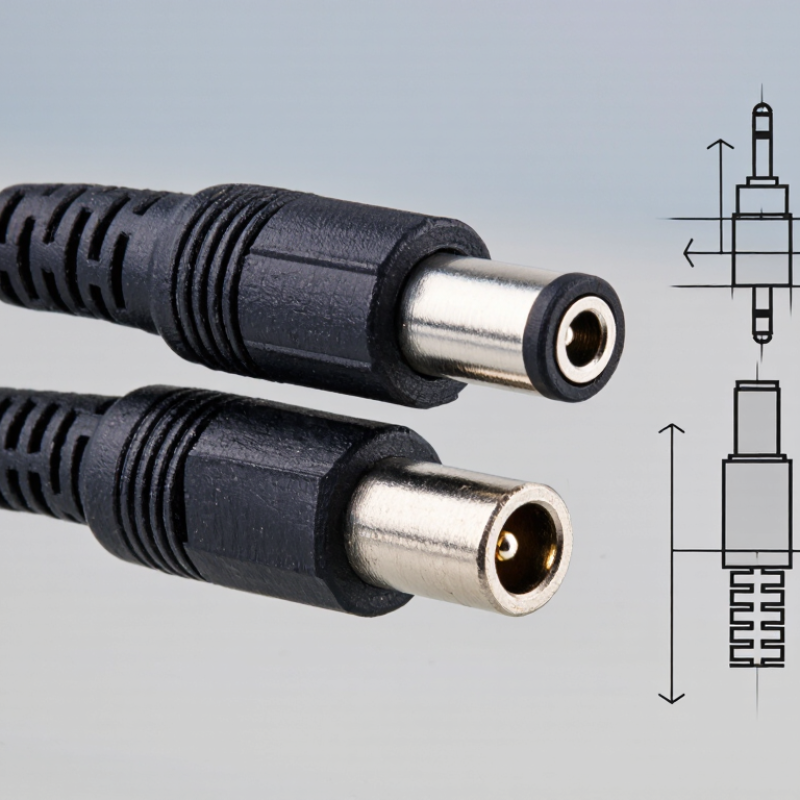
A DC power connector transfers direct current from a power supply to an electronic device. Its main parts are the plug, matching socket, metal contacts, insulating body, and cable termination. In a common barrel style, a hollow outer sleeve surrounds a smaller inner contact. One contact carries the positive supply, while the other provides the return path. Polarity varies. Do not assume the center is positive; check the device label or wiring diagram. Spring contacts inside the socket press against the plug’s metal surfaces, creating a conductive path.

A loose fit can interrupt power when the cable moves. Tiny movements matter.

The insulating housing keeps the contacts apart and helps prevent accidental short circuits. Cable conductors connect the contacts to the supply, while strain relief reduces bending where the cable meets the plug. Repeated pulls may break wires inside the jacket, even when the outside looks fine. Some connectors use a locking feature or keyed shape to resist disconnection or incorrect insertion. Dimensions matter: a plug with the wrong barrel diameter may seem to fit but make unreliable contact. Match the plug size, voltage, current rating, and polarity to the device specifications. A quick visual check helps, but it cannot confirm internal wiring or worn contacts. This detail is easy to overlook during setup.

How Electrical Power Flows Through the Connector

A DC power connector carries direct current from a supply to a device, but power does not travel through one contact alone. In a common barrel-style connector, the inner contact and outer sleeve form separate paths. One carries the supply voltage; the other provides the return path to the source. Polarity depends on the device design, so the center contact is not always positive. Check the device marking and supply specifications before connecting them. A plug can fit and still be electrically wrong.

When the plug enters its socket, spring contacts press against conductive surfaces. This contact pressure keeps resistance low and helps limit heat. Current flows only when the circuit is complete: from the supply, through the connector and device, then back along the return conductor. A loose fit may interrupt that path, causing flicker, resets, or warmth near the plug.

Small details matter. Cable thickness, connector rating, and load current all affect reliable operation. A device drawing more current than the connector is rated for can overheat its contacts. Disconnect power before inspecting a damaged plug, and replace parts that feel loose or show darkening. It is easy to blame the power supply first; sometimes the connector is the weak link.

Common DC Connector Types and Configurations

DC connectors appear in several practical forms, each suited to different equipment and installation conditions. The familiar barrel connector has a cylindrical plug that fits into a matching socket. Its inner and outer diameters must match; a plug that feels close may still make intermittent contact. Small details matter. Barrel connectors often use a center-positive or center-negative arrangement, so check the device markings before connecting power.

Two-pin DC connectors separate positive and negative contacts in a compact housing. They are common where polarity needs to stay consistent during repeated connection. Screw-terminal connectors, by contrast, clamp stripped wire ends in place and suit fixed installations. Some plug-and-socket designs include a latch or threaded collar. These features help resist accidental disconnection when a cable is pulled or a device vibrates.

Configurations also differ by contact count, mounting style, and current capacity. A panel-mounted socket sits firmly in an enclosure, while a cable-mounted plug moves with the lead. Before choosing one, compare the connector’s voltage and current ratings with the supply and load. Inspect the pin layout and polarity diagram, too. I have found that connector dimensions are easy to misjudge by sight; a caliper and the equipment specifications are more dependable. A snug fit alone proves little.

Applications and Key Selection Factors

DC power connectors appear in routers, LED strips, small appliances, test equipment, and battery-powered devices. A barrel plug may look simple, but a poor fit can interrupt power or create heat. In a workshop, even slight movement of a cable can expose a weak connection. Small details matter.

Match the connector’s voltage and current ratings to the device’s requirements, with suitable headroom. Check the inner and outer diameters, plug length, and polarity; similar-looking plugs may not be interchangeable. Confirm polarity from the equipment label or technical documentation, rather than guessing from wire colors. A snug fit helps, but it does not prove the electrical contact is reliable. I still treat that as a limitation of visual inspection.

Consider how the connector will be used. A desk device may need only occasional connection, while portable equipment benefits from strain relief and a cable that tolerates repeated bending. In damp, dusty, or vibrating settings, look for an appropriate enclosure and locking or retention features. Also check cable thickness, available clearance, and expected insertion cycles. Test the selected connector under normal load and inspect for looseness or unusual warmth. One trade-off remains: a compact plug saves space, but can be harder to grip.

FAQS

What are the main parts of a DC power connector?

It has a plug, socket, metal contacts, insulating body, and cable connection. Strain relief helps protect the cable near the plug.

How can I check a connector’s polarity?

Check the device label or wiring diagram before connecting power. The center contact is not always positive.

Why can a plug that seems to fit still lose power?

Its inner or outer diameter may be slightly wrong. Cable movement can also interrupt contact. Tiny movements matter.

What does the insulating housing do?

It keeps metal contacts apart and helps prevent accidental short circuits. A cracked housing deserves attention.

Which connector type suits a fixed installation?

Screw-terminal connectors clamp stripped wire ends in place. Panel-mounted sockets can also sit firmly in an enclosure.

How do latches and threaded collars help?

They resist accidental disconnection when a cable is pulled or equipment vibrates. Not foolproof, though.

What should I compare before choosing a connector?

Match its voltage and current ratings to the supply and load. Check the pin layout, polarity, and dimensions, too.

How can I check whether a barrel plug is the right size?

Compare its inner and outer diameters with the socket specifications. A caliper is more dependable than sight. I still judge by feel sometimes; that can be wrong.

Conclusion

A Dc Power Connector is an interface that transfers direct-current electricity from a power source to an electronic device. It typically includes a plug, a matching socket, conductive contacts, an insulating body, and sometimes a locking feature. Each part helps maintain electrical contact, separate conductive elements, and keep the connection secure during use.

Power flows from the source through the connector’s positive contact and into the device, then returns through the negative contact to complete the circuit. DC connectors come in various shapes and configurations, including barrel-style, pin-based, and locking designs, with differences in size, polarity, and current capacity. They are used in equipment such as electronic devices, lighting systems, and control units. Choosing a connector involves checking voltage and current requirements, dimensions, polarity, installation conditions, and how often the connection will be plugged and unplugged. A suitable choice supports a reliable connection and helps the device operate as intended.


Charlotte

Charlotte

Charlotte is a seasoned marketing professional with a deep understanding of the company's portfolio and a passion for elevating its presence in the market. With a keen eye for detail and a commitment to excellence, she ensures that our professional blog is regularly updated with insightful articles......